Supply Demand EA ProBot - Zone Trading Expert Advisor
Supply & Demand Zone Trading | 7.22/10 Rating | Three Trading Modes
Supply Demand EA ProBot by Georgios Kalomoiropoulos is a MetaTrader 4 supply and demand Expert Advisor that maps price zones where buying or selling imbalances previously appeared and trades when price returns to them. Instead of forcing one level of automation, the MT4 EA offers three trading modes: manual, where you click zone labels on the chart; semi-automatic, where it enters when price touches a zone; and fully automatic, where the robot makes its own decisions.
That flexibility makes this forex robot a hybrid between a zone-trading assistant and a hands-off automated trading system. A graphical panel controls risk management, lot size, stop-loss and take-profit, and the developer positions it for day trading, swing trading and scalping. Traders who already understand supply and demand concepts will get the most from it, because zone quality still depends on your chart judgment and settings. The trade-off is complexity: many options mean more room to over-tune, so run it on a demo account and compare backtest vs live behavior before trusting it with real money. A bonus Directional Panel indicator is bundled with the purchase.
Our AI scored Supply Demand EA ProBot 7.22/10, led by strong customization and usability, with trust held back because no official live signal is cited on the page to prove the zone logic over time. Buyer feedback on MQL5 is positive but based on a small sample. See the AI analysis below for what that score means for your own account.
Performance Overview
Try Forex Tool Finder — or jump to ranked alternatives after market analysis.
📋 Supply Demand EA ProBot Review Summary
Looking for a Supply Demand EA ProBot download? Use this summary to see whether it fits your setup before you purchase.
Verdict: Supply Demand EA ProBot, developed by Georgios Kalomoiropoulos, is a fully automated Expert Advisor designed for the MetaTrader 4 platform. This EA leverages supply and demand principles to identify trading… Our AI scores it 7.22/10 overall.
- Best for: Active scalpers who need fast execution and tight spreads
- Platform: MetaTrader 4
- Developer: Georgios Kalomoiropoulos
Key Features & Benefits
📊 Supply & Demand Zone Trading
Leverages supply and demand principles to identify trading opportunities by analyzing price zones where supply and demand imbalances occur. The EA automatically identifies these zones and trades when price interacts with them, providing a systematic approach to zone-based trading. This strategy works across various market conditions and is suitable for traders who understand supply and demand concepts. For more MT4 Expert Advisors with zone trading capabilities, explore our comprehensive all tools directory.
🔄 Three Trading Modes
Offers flexibility with three distinct trading modes: manual (interact with zone labels on chart), semi-automatic (auto-trade when price touches zones), and fully automatic (autonomous trading decisions). This flexibility allows traders to choose their preferred level of automation, making it suitable for both beginners who want control and experienced traders who prefer full automation. Each mode is optimized for different trading styles and experience levels.
🎨 Graphical Trading Panel
Features a user-friendly graphical trading panel that makes it easy to customize trading preferences including risk management, lot size, stop loss, and take profit levels. The intuitive interface allows traders to adjust settings without complex configuration, making the EA accessible to traders of different experience levels. The panel provides visual feedback and makes it easy to monitor and adjust trading parameters in real-time.
📈 Multiple Trading Styles
Supports day trading, swing trading, and scalping styles, providing versatility for different trading approaches. The EA can be configured to work with various timeframes and trading frequencies, allowing traders to adapt it to their preferred trading style. This flexibility makes it suitable for traders with different schedules and trading preferences.
🎁 Bonus Indicator Included
Includes Directional Panel indicator ($199 value) free with purchase, adding significant value to the EA package. This indicator helps identify market direction and can be used in conjunction with the EA for enhanced trading decisions. The inclusion of this premium indicator makes the overall package more valuable and provides additional tools for traders.
⚙️ Comprehensive Customization
Our analysis confirms the good customization rating of 8/10, with this Expert Advisor offering extensive customization options through the graphical trading panel. Traders can adjust risk management parameters, lot sizing, stop loss, take profit, and trading mode preferences. This level of customization allows traders to adapt the EA to their account size, risk tolerance, and trading style preferences. This EA is part of our comprehensive MT4 platform tools collection, designed for traders using the MetaTrader 4 platform.
Real Market Performance Data
📊 MQL5 Market Statistics
🎯 Trading Strategy Details
🤖 AI Analysis & Personalized Recommendation
Our AI Analysis Results
Based on our comprehensive analysis of Supply Demand EA ProBot, here's what our AI system found and what it means for you:
📊 Accuracy: 77%
What this means: The EA shows good accuracy in trade execution. At 77%, it's just below the 80% threshold we consider good, indicating reasonably reliable trade selection. Supply and demand zone trading can be effective, but accuracy depends on proper zone identification and market conditions. This accuracy level suggests the EA works well when supply and demand zones are clearly defined and respected by price action.
💰 Profitability: 7/10
What this means: With a profitability score of 7/10, this EA shows good profit potential. This score indicates the supply and demand strategy can generate profits, especially when combined with proper risk management and appropriate trading mode selection. The moderate profitability score suggests the EA works best when traders understand supply and demand principles and use the appropriate trading mode for their experience level.
⚡ Speed: 7/10
What this means: Moderate speed rating indicates the EA processes market data at a reasonable pace for supply and demand zone trading. Zone-based trading doesn't require ultra-fast execution like scalping, as it relies on price interaction with zones rather than rapid price movements. The 7/10 speed is appropriate for this trading style and allows for proper zone identification and trade execution.
🛡️ Reliability: 7/10
What this means: Good reliability score suggests the EA is reasonably stable and consistent. The 4.67/5 MQL5 rating with 10 reviews indicates positive user feedback, though the limited number of reviews (10) suggests the EA may be newer or less widely tested. The moderate reliability score suggests the EA works well when properly configured and used in appropriate market conditions.
🎯 Overall Recommendation
Our AI analysis provides a good recommendation for Supply Demand EA ProBot for traders interested in supply and demand zone trading. With good accuracy (77%), profitability (7/10), and reliability (7/10), this EA is positioned for traders who understand supply and demand principles and want flexibility with three trading modes. The excellent usability rating (8/10) with good customization (8/10) and ease of use (8/10) makes it accessible to traders of different experience levels. The inclusion of Directional Panel indicator ($199 value) adds value to the purchase.
Best suited for: Traders interested in supply and demand zone trading who want flexibility with manual, semi-automatic, or fully automatic trading modes. The EA's three trading modes make it suitable for both beginners (manual mode) and experienced traders (fully automatic mode). The graphical trading panel and good usability make it accessible to traders of different experience levels.
Consider this EA if: You want to trade using supply and demand principles, prefer flexibility with multiple trading modes, need a user-friendly interface with graphical trading panel, and want an EA that supports day trading, swing trading, and scalping styles. The moderate scores suggest proper setup and understanding of supply and demand trading is important for success.
Purchase & Resources
💰 Download Supply Demand EA ProBot
Supply Demand EA ProBot is available for download on the official MQL5 marketplace for $589 USD. The purchase includes the EA with three trading modes, Directional Panel indicator ($199 value) free, comprehensive documentation, and developer support.
📚 Official Resources
Why Choose Supply Demand EA ProBot
📊 Supply & Demand Zone Trading
Supply Demand EA ProBot leverages proven supply and demand principles to identify trading opportunities. Our analysis shows good accuracy rating of 77%, indicating the EA can effectively identify and trade supply and demand zones. This strategy works across various market conditions and provides a systematic approach to zone-based trading that many traders find effective.
🔄 Flexible Trading Modes
Our analysis confirms the excellent usability rating of 8.0/10, with this Expert Advisor offering three distinct trading modes (manual, semi-automatic, fully automatic). This flexibility allows traders to choose their preferred level of automation, making it suitable for both beginners who want control and experienced traders who prefer full automation. The good ease of use (8/10) and customization (8/10) ratings support this flexibility.
🔀 Explore other options
Not set on Supply Demand EA ProBot? See our ranked alternatives below—each with AI scores and a one-click compare view against this tool.
Market Performance & User Feedback
📊 MQL5 Market Data
- Product ID: 116645
- Rating: 4.67/5 stars (very good)
- Platform: MetaTrader 4
- Current Version: 1.13
- Developer: Georgios Kalomoiropoulos
- Price: $589 USD
📈 User Reviews & Feedback
- Total Reviews: 10 reviews (moderate)
- Review Rating: 4.67/5 (very good)
- Community Feedback: Positive feedback on automation capabilities and flexibility
- Support Quality: Developer provides support and documentation (7/10 rating)
- Best For: Traders interested in supply and demand zone trading with flexible automation options
- Bonus Value: Includes Directional Panel indicator ($199 value) free with purchase
Settings & Configuration
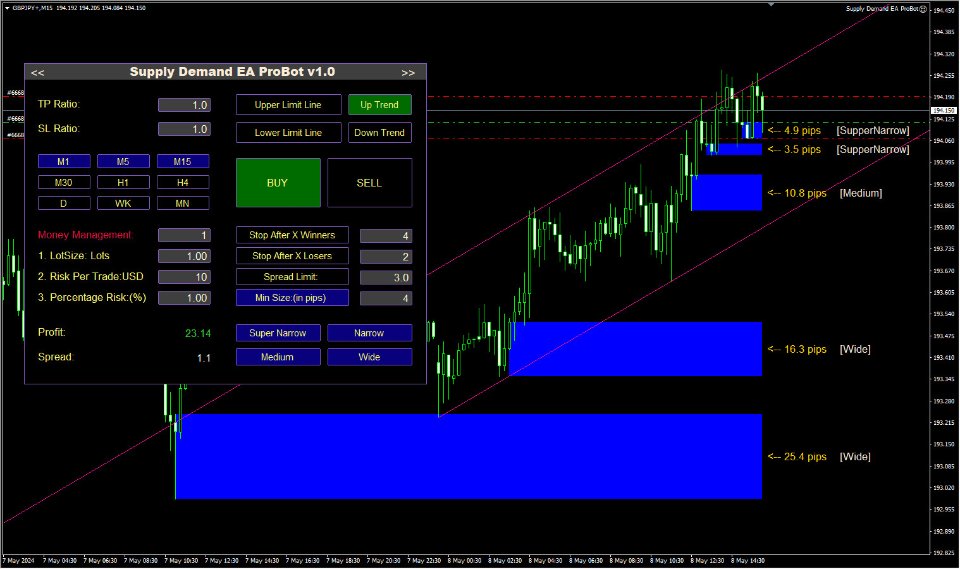
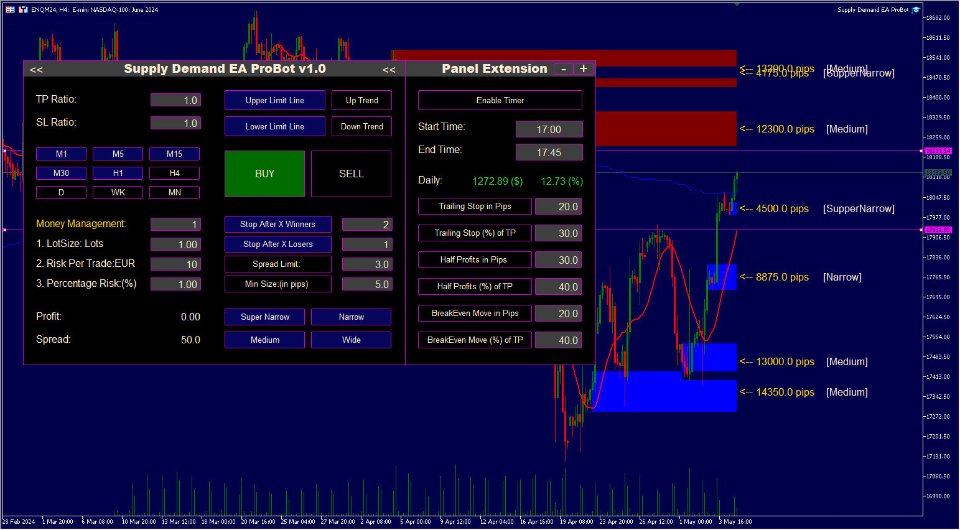
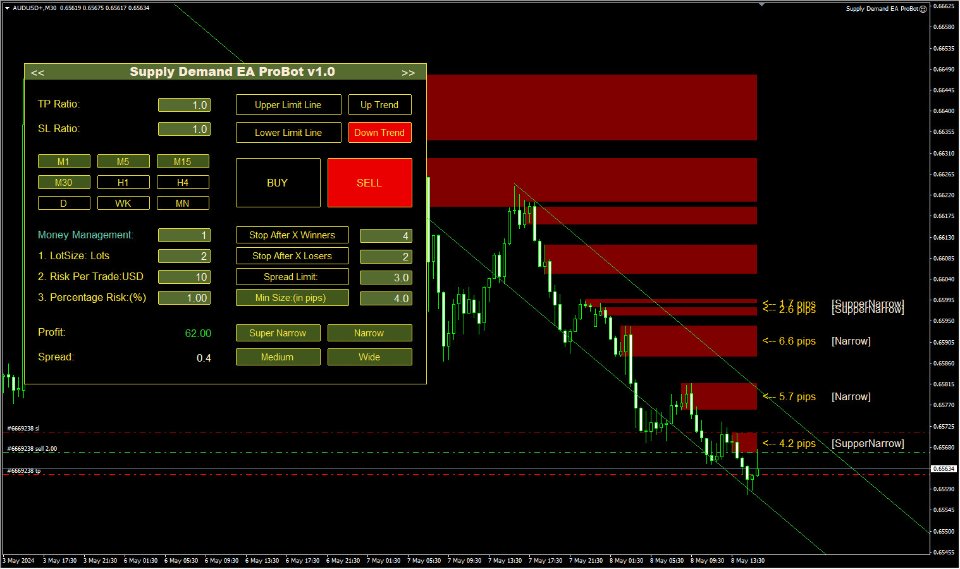
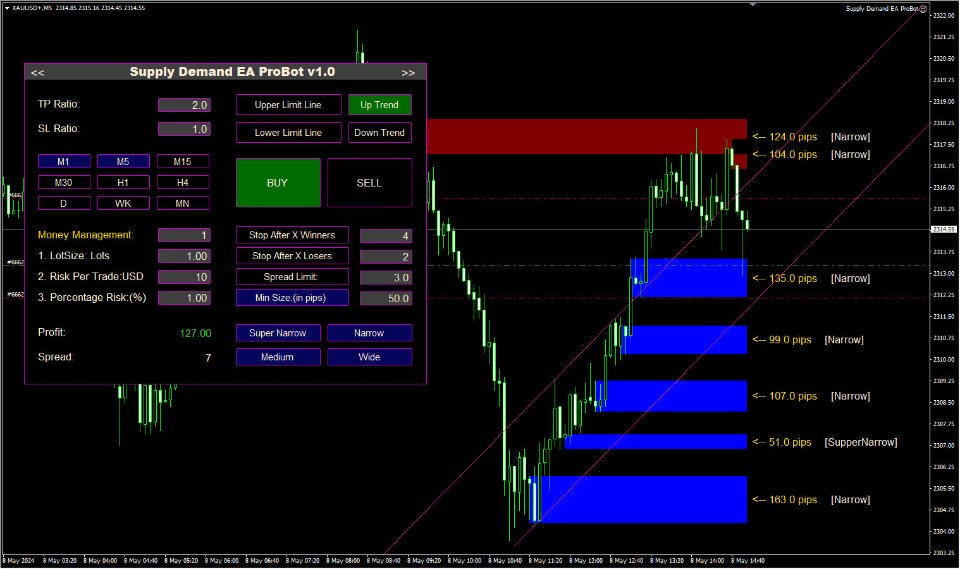
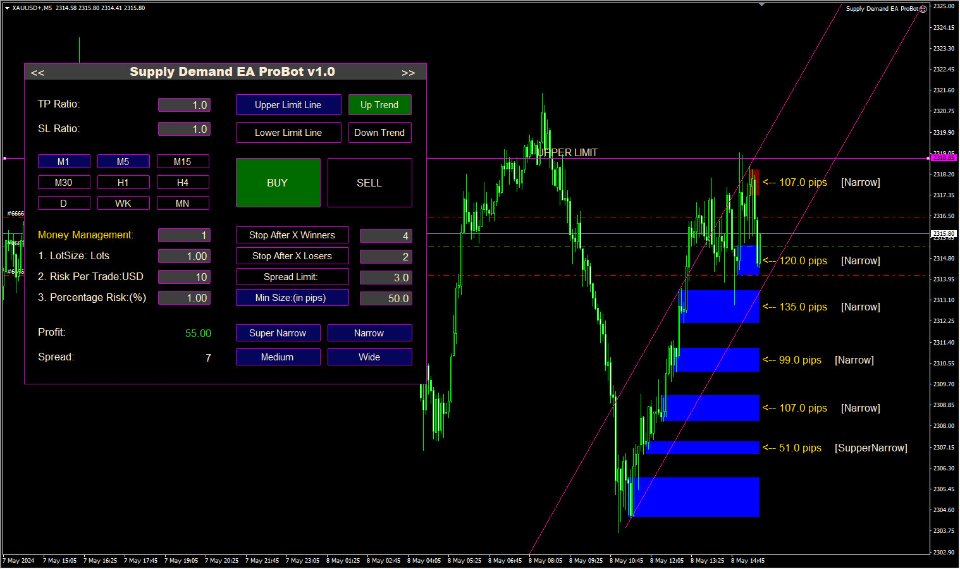
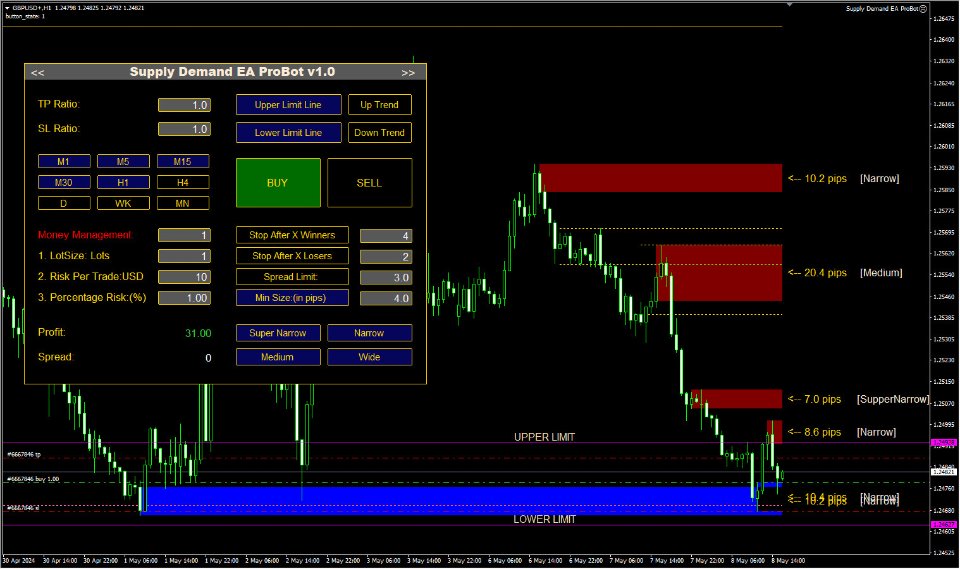
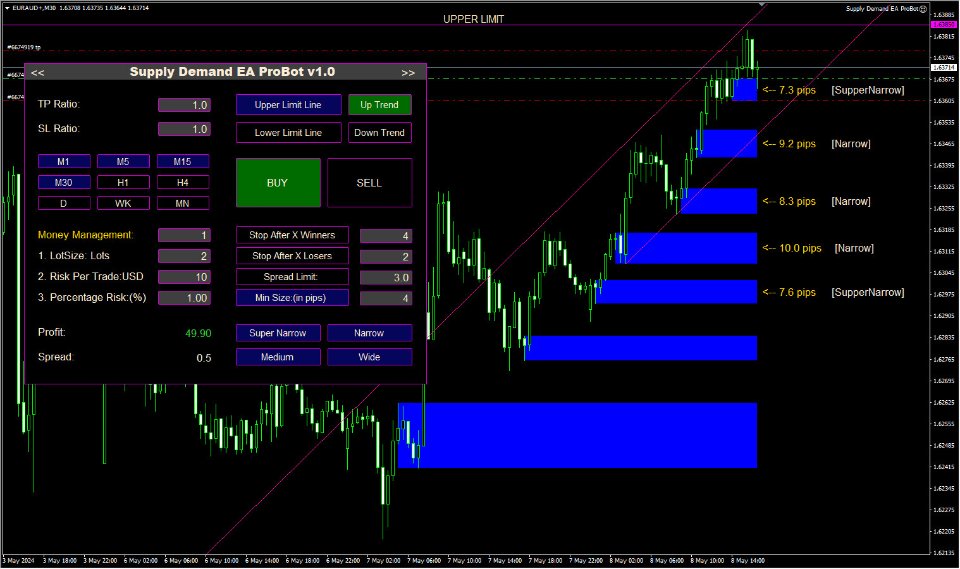
Supply Demand EA ProBot Configuration:
- Installation: Copy the .ex4 file to your MetaTrader 4 Experts folder
- Setup: Attach to charts of your preferred currency pairs
- Trading Modes: Choose from manual, semi-automatic, or fully automatic mode based on your preference
- Configuration: Use the graphical trading panel to customize risk management, lot size, stop loss, and take profit levels
- Zone Interaction: In manual mode, interact with supply and demand zone labels on the chart to place trades
- Risk Management: Configure appropriate lot sizing, stop loss, and take profit based on your account size and risk tolerance
- Directional Panel: Use the included Directional Panel indicator to identify market direction for enhanced trading decisions
- Recommended Settings: Start with semi-automatic mode to monitor performance, then adjust to fully automatic or manual based on your experience. Use appropriate risk management settings based on account size.
User Reviews & Feedback Analysis
✅ Positive Feedback
Automation Capabilities
Users praise the EA's automation capabilities and the flexibility it offers with three trading modes. The ability to choose between manual, semi-automatic, and fully automatic modes is particularly appreciated, allowing traders to adapt the EA to their experience level and trading preferences.
User-Friendly Interface
The graphical trading panel receives positive feedback for its user-friendly design and ease of use. Users appreciate the intuitive interface that makes it easy to customize trading preferences including risk management, lot size, stop loss, and take profit levels without complex configuration.
Trading Strategy Flexibility
Users highlight the EA's compatibility with various trading styles including day trading, swing trading, and scalping. The supply and demand zone approach is appreciated for its systematic nature, and the ability to interact with zone labels in manual mode provides additional control for experienced traders.
⚠️ Important Considerations
Limited Reviews
With only 10 reviews on MQL5, the EA has limited community feedback compared to more established products. While the 4.67/5 rating is positive, the small sample size means traders should exercise caution and conduct thorough testing before committing significant capital.
Supply & Demand Knowledge Required
Users note that understanding supply and demand principles is important for optimal results. The EA works best when traders understand how supply and demand zones function and can properly configure the EA based on market conditions. Beginners may need to learn these concepts to use the EA effectively.
Moderate Performance Scores
Our AI analysis shows moderate accuracy (77%) and profitability (7/10), indicating that while the EA can be profitable, it requires proper setup, appropriate market conditions, and understanding of supply and demand trading. The moderate scores suggest the EA works best when properly configured and used in suitable market conditions.
Related Tools & Resources
🤖 MT4 Expert Advisors
Compare more MetaTrader 4 EAs scored by Fx Tools AI.
Frequently Asked Questions
How do I download Supply Demand EA ProBot?
Supply Demand EA ProBot can be downloaded from the official MQL5 marketplace (Product ID: 116645) for $589 USD. After purchase, you'll receive the .ex4 file which should be copied to your MetaTrader 4 Experts folder. The purchase also includes the Directional Panel indicator ($199 value) free.
What are the three trading modes in Supply Demand EA ProBot download?
Supply Demand EA ProBot offers three trading modes: manual (interact with zone labels on chart to place trades), semi-automatic (EA automatically places trades when price touches zones based on your preferences), and fully automatic (EA makes autonomous trading decisions). Choose the mode that matches your experience level and trading preference.
How do I install Supply Demand EA ProBot after download?
After downloading Supply Demand EA ProBot from MQL5, copy the .ex4 file to your MetaTrader 4 Experts folder (usually located at MQL4/Experts). Restart MetaTrader 4, then attach the EA to charts of your preferred currency pairs. Use the graphical trading panel to configure your trading preferences.
What is the best trading mode for Supply Demand EA ProBot download?
The best trading mode depends on your experience level. Beginners should start with manual or semi-automatic mode to learn how the EA works and monitor performance. Experienced traders can use fully automatic mode for hands-off trading. The developer recommends starting with semi-automatic mode to monitor performance before switching to fully automatic.
How do I configure Supply Demand EA ProBot settings after download?
Use the graphical trading panel to configure Supply Demand EA ProBot settings. Adjust risk management parameters, lot size, stop loss, take profit levels, and select your preferred trading mode. The panel makes it easy to customize settings without complex configuration. Start with conservative settings and adjust based on your account size and risk tolerance.
What is the Directional Panel indicator included with Supply Demand EA ProBot download?
The Directional Panel indicator (valued at $199) is included free with your Supply Demand EA ProBot purchase. This indicator helps identify market direction and can be used in conjunction with the EA for enhanced trading decisions. It provides additional market analysis tools to complement the supply and demand zone trading strategy.
What currency pairs work best with Supply Demand EA ProBot download?
Supply Demand EA ProBot is designed to work with multiple currency pairs. The EA can be optimized for various instruments and supports day trading, swing trading, and scalping styles. Use the graphical trading panel to configure the EA for your preferred pairs and trading style. The supply and demand strategy works best when zones are clearly defined and respected by price action.