
FX
Tools
AI
Free Download | Pullback Strategy | M30 Timeframe | 5.74/10 Rating
RMI Scalper EA MT4, developed by Robots4Forex Ltd, is a fully automated Expert Advisor that trades pullbacks from the major trend using RMI (Relative Momentum Index) and limited averaging. The EA trades using market orders and uses averaging to safely turn otherwise negative trades positive. This EA works best on USDJPY, EURUSD, GBPUSD, USDCAD, USDCHF, AUDJPY, EURCAD, EURGBP, and EURJPY using the M30 timeframe and has the option to trade multiple pairs but only one pair at any one time to increase trade frequency without increasing drawdown.
The EA features risk money management, works on any account size, always has a stop loss in place, and is designed for hedge accounts only. The system has the option to be NFA/FIFO compliant, uses no grids, no Martingale, and works on any VPS. The developer has made this EA available for free with limited support so they can concentrate on custom EA development.
Based on our comprehensive analysis of RMI Scalper EA MT4, here's what our AI system found and what it means for you:
What this means: The EA shows moderate accuracy in trade execution. At 65%, it's below the 80% threshold we consider good, indicating that trade selection may not be highly reliable. This suggests the pullback strategy using RMI indicator may need optimization and careful monitoring. The averaging feature helps recover some losing trades, but the moderate accuracy means you should expect some losing trades.
What this means: With a profitability score of 5/10, this EA shows moderate profit potential. This score indicates the strategy may generate some profits but is not highly recommended for aggressive profit-seeking. The free nature of the tool and limited support suggest it's better suited for learning and testing rather than serious trading. Profitability 5/10 means it's not recommended for high-profit expectations.
What this means: Good speed rating indicates efficient execution for scalping on M30 timeframe. The EA processes market data reasonably quickly to identify pullback opportunities and execute trades. Speed 7/10 is sufficient for the scalping strategy's requirements, allowing timely entry and exit from trades.
What this means: Moderate reliability score suggests the EA may have some stability concerns. The averaging strategy can help recover trades but also increases risk. The free tool with limited support (3/10) and low update frequency (3/10) indicate the developer is not actively maintaining it. Reliability 5/10 means you should monitor the EA closely and be prepared for potential issues.
Our AI analysis provides a moderate recommendation for RMI Scalper EA MT4. With moderate accuracy (65%), moderate profitability (5/10), good speed (7/10), and moderate reliability (5/10), this EA shows promise for pullback trading strategies but requires careful optimization and monitoring. The free download makes it accessible for testing, but the low trust score (3.33/10) due to limited support and updates suggests it's better for learning and experimentation rather than serious trading. We recommend using this EA as a learning tool or for testing pullback strategies, but not as a primary trading system without proper optimization.
Best suited for: Traders looking to learn pullback trading strategies or test RMI-based trading approaches. The EA works well for educational purposes and testing on demo accounts. With good usability (8.0/10) and compatibility (9/10), it's easy to set up and works on any account size. The moderate profitability and reliability scores suggest it's better for learning and testing rather than aggressive profit-seeking. For more options, check out our complete list of AI-rated forex tools or explore other MT4 Expert Advisors.
Consider this EA if: You want to learn pullback trading strategies, are looking for a free tool to test RMI-based approaches, prefer to optimize settings yourself, and are comfortable with moderate accuracy and profitability ratings. The EA's strength lies in its usability and compatibility, making it easy to set up and test. However, we recommend using it primarily for educational purposes and demo account testing rather than relying on it as a standalone solution for live trading.
Fully automated pullback trading strategy using RMI (Relative Momentum Index) to identify pullbacks from major trends. The EA trades using market orders and focuses on high-probability pullback opportunities on M30 timeframe for multiple currency pairs including USDJPY, EURUSD, GBPUSD, USDCAD, USDCHF, AUDJPY, EURCAD, EURGBP, and EURJPY.
Uses averaging to safely turn otherwise negative trades positive. The averaging system helps recover losing trades while maintaining risk control. The EA features configurable averaging parameters including AveragingStep, AveragingBars, AveragingMultiplier, and AveragingCount to customize the recovery strategy.
Comprehensive risk management including money management options, fixed stop loss always in place, break-even functionality, and trailing stops. The EA works on any account size and includes account profit lock feature to protect gains. Features NFA/FIFO compliance option for regulated brokers.
Works on multiple currency pairs from one chart with MultiPairSingleTrade option to limit trades to one pair at a time, increasing trade frequency without increasing drawdown. Supports 9 major pairs including USDJPY, EURUSD, GBPUSD, USDCAD, USDCHF, AUDJPY, EURCAD, EURGBP, and EURJPY on the MetaTrader 4 platform.
Extensive input settings for customization including order settings, entry settings, RMI parameters, averaging controls, break-even options, and trailing stop configurations. The EA allows traders to optimize settings for their specific trading preferences and risk tolerance, making it suitable for MT4 Expert Advisors requiring customization.
Available as a free download from the MQL5 marketplace, making it accessible for traders to test and learn pullback trading strategies. The developer has made this EA free with limited support to focus on custom EA development, providing an opportunity for traders to experiment with RMI-based trading approaches.
RMI Scalper EA MT4 is available as a free download, making it accessible for traders to learn pullback trading strategies and test RMI-based approaches. The free availability allows traders to experiment with the strategy without financial investment, perfect for educational purposes and demo account testing.
RMI Scalper EA MT4 features excellent usability (8.0/10) with extensive input settings for customization. The EA works on any account size, supports multiple currency pairs from one chart, and includes comprehensive risk management options. With good compatibility (9/10), it's easy to set up and works on any VPS.
The EA uses limited averaging to safely turn otherwise negative trades positive, providing a recovery mechanism for losing trades. The averaging system is configurable with parameters for step, bars, multiplier, and count, allowing traders to customize the recovery strategy based on their risk tolerance.
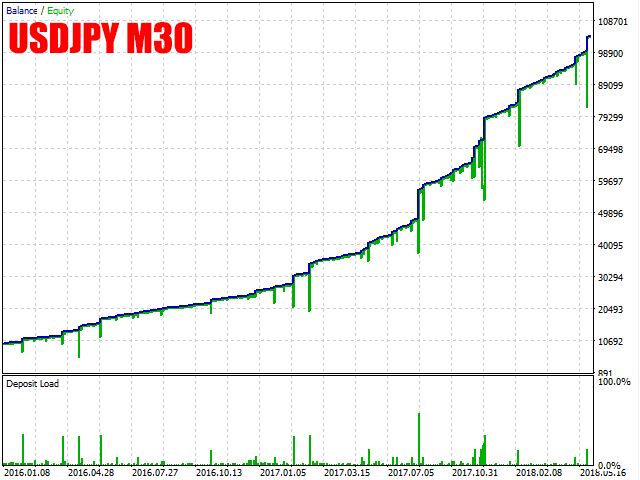
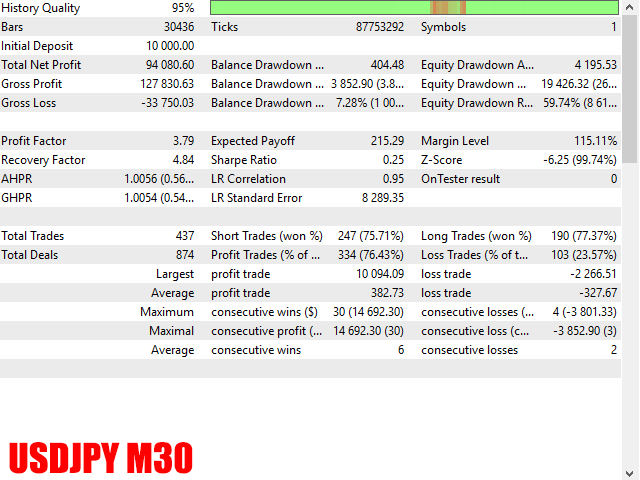
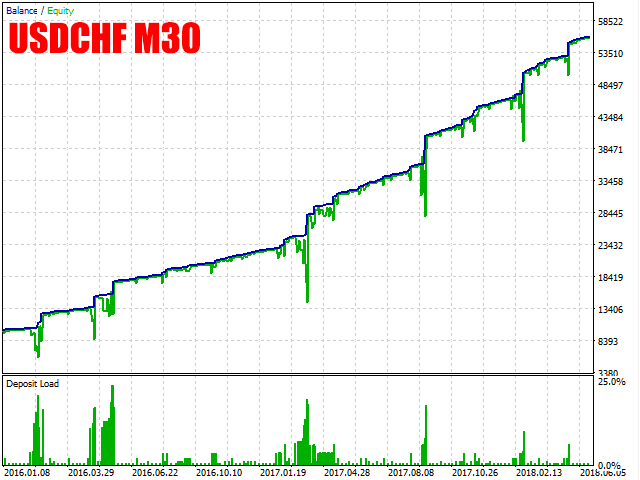
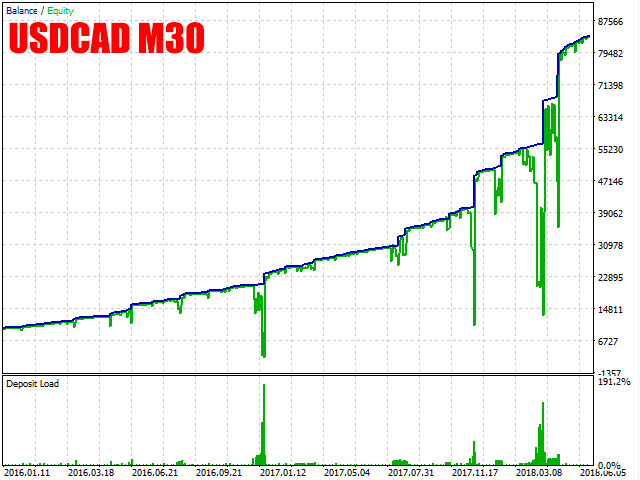
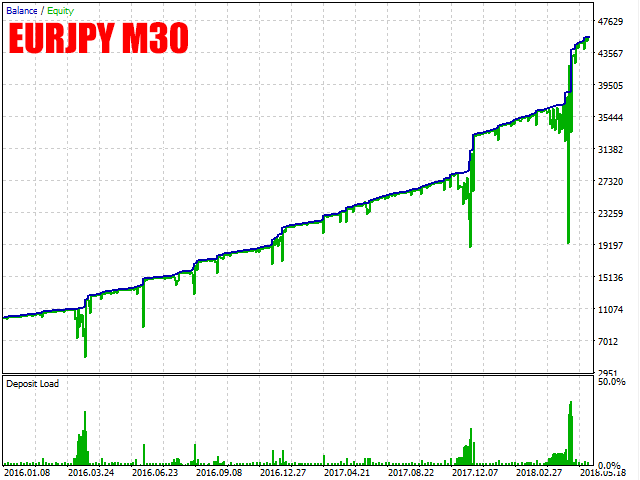
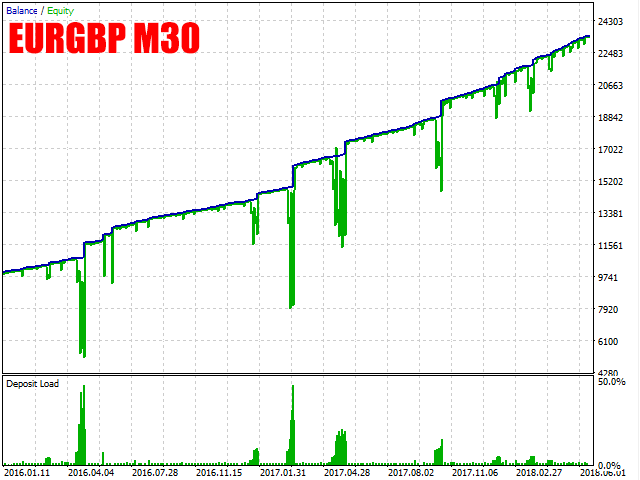
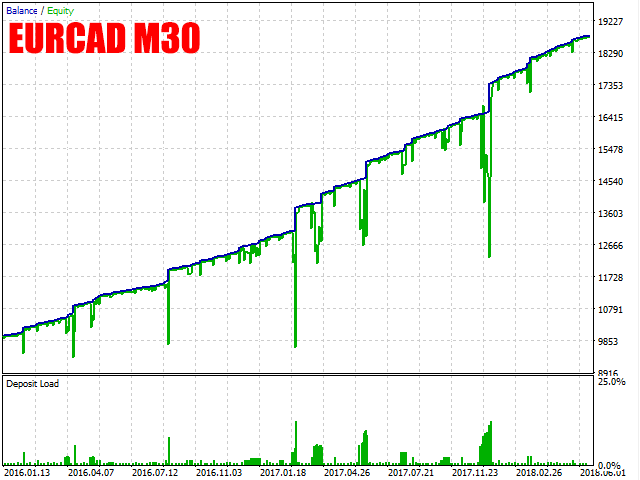

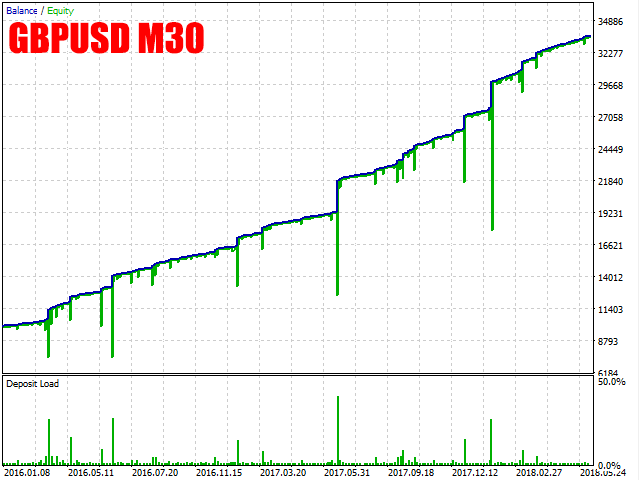

RMI Scalper EA MT4 Configuration:
💡 Tip: The developer has made this EA free with limited support. The EA will need optimizing for best results. If you feel like sharing your optimized settings, please do so in the comments on the MQL5 page.
RMI Scalper EA MT4 is available for free download on the official MQL5 marketplace. The free download includes the EA file and basic documentation. Note that the developer provides limited support as they focus on custom EA development.
Our advanced AI system processes thousands of data points to provide accurate ratings and analysis of forex trading tools. Unlike human analysis, our AI can:
Analyzes live market data, user reviews, performance metrics, and technical specifications simultaneously across multiple sources.
Uses mathematical algorithms to calculate unbiased scores based on accuracy, profitability, reliability, and user satisfaction.
Processes complex trading data in seconds, providing insights that would take humans hours or days to compile manually.
Identifies hidden patterns in trading performance, market behavior, and user feedback that human analysts might miss.
Discover more AI-analyzed forex tools and get unbiased ratings for your trading decisions.
🏠 Explore All AI-Rated Forex ToolsUsers appreciate the free availability of the EA, making it accessible for learning pullback trading strategies and testing RMI-based approaches without financial investment. The free download allows traders to experiment and optimize settings.
The averaging feature is noted for helping recover some losing trades, providing a safety mechanism. Users find the configurable averaging parameters useful for customizing the recovery strategy based on their risk tolerance.
The ability to trade multiple currency pairs from one chart with the MultiPairSingleTrade option is appreciated. This feature allows traders to increase trade frequency without increasing drawdown by limiting trades to one pair at a time.
The developer explicitly states that the EA will need optimizing for best results. Users should expect to spend time optimizing settings for their specific pairs and market conditions. The moderate accuracy (65%) and profitability (5/10) scores reflect this need for optimization.
The developer provides limited support as they focus on custom EA development. This is reflected in the low customer support score (3/10) and update frequency (3/10). Users should be prepared to optimize and troubleshoot on their own.
The EA shows moderate accuracy (65%) and profitability (5/10), indicating it's better suited for learning and testing rather than serious live trading. The averaging strategy can help but also increases risk, requiring careful monitoring.
Scalping Expert Advisor for MT4 platform with advanced market analysis and risk management features for multiple currency pairs.
Scalping Expert Advisor with advanced market analysis capabilities and automated trading features for MT4 platform.
Professional scalping Expert Advisor with advanced entry and exit strategies for MT4 platform.
RMI Scalper EA MT4 is available for free download on the official MQL5 marketplace. Visit the product page at https://www.mql5.com/en/market/product/30112 and click the download button. You'll need to be logged into your MQL5 account to download the EA file.
RMI Scalper EA MT4 works best on USDJPY, EURUSD, GBPUSD, USDCAD, USDCHF, AUDJPY, EURCAD, EURGBP, and EURJPY using the M30 timeframe. The EA can trade multiple pairs from one chart but limits to one pair at a time when MultiPairSingleTrade is enabled.
After downloading RMI Scalper EA MT4 from MQL5, copy the .ex4 file to your MetaTrader 4 Experts folder. Attach it to one chart (M30 timeframe recommended) and configure the settings including RMI parameters, averaging settings, risk management, and trading pairs. The EA will need optimization for best results.
The developer recommends optimizing settings for your specific pairs. Key settings include RMIPeriod (2-50), MomPeriod (2-50), RMIThreshold (5-45, smaller = fewer trades), AveragingStep (5-100 pips), StopLoss (25-4000 pips depending on pair), and TakeProfit (0-200 pips). Enable MoneyManagement for risk-based lot sizing.
The RMI (Relative Momentum Index) pullback strategy identifies pullbacks from major trends using RMI indicator signals. The EA enters trades when pullback conditions are met, using averaging to recover losing trades. The strategy works on M30 timeframe and focuses on high-probability pullback opportunities.
The averaging feature uses additional trades to recover losing positions. Configure AveragingStep (negative move in pips to trigger next averaging trade), AveragingBars (bars before step is ignored), AveragingMultiplier (lot multiplier), and AveragingCount (max open trades before loss). This helps turn negative trades positive but requires careful risk management.
RMI Scalper EA MT4 shows moderate accuracy (65%) and profitability (5/10), indicating it's better suited for learning and testing rather than serious live trading. The EA requires optimization and the developer provides limited support. We recommend using it primarily for educational purposes and demo account testing.
Robots4Forex Ltd provides limited support for RMI Scalper EA MT4 as they focus on custom EA development. The EA is given away for free with basic documentation. Users are encouraged to optimize settings themselves and share optimized settings in the comments section on the MQL5 page.