
GTX Scalper - EURUSD Scalping Expert Advisor
Multi-Strategy MT5 EA | 7.83/10 Rating | 22 Customizable Strategies
GTX Scalper by Vladimir Mametov is a EURUSD Expert Advisor for MetaTrader 5 that trades from the H1 chart. Its entries come from pivot points mapped against overbought and oversold zones, and the robot bundles 22 customizable strategies that can be switched, combined or optimized for different brokers. Exits are handled by a trailing stop or a take-profit, while every order carries a dynamic and static stop-loss; the developer also describes an optional recovery function but states there is no martingale or other dangerous position sizing.
This MT5 EA fits traders who want a single-pair forex robot they can tinker with rather than a sealed black box. Preset settings are said to work with most brokers, and a news filter plus a trading-time filter help avoid the most erratic sessions. Because it is marketed as a scalper, low spreads on an ECN account and a stable VPS matter more than usual, and the sheer number of strategy combinations means it is easy to over-optimize a backtest that later disappoints in live trading. Run the default configuration on a demo first, then change one strategy group at a time and keep risk per trade modest.
Our AI scores GTX Scalper 7.83/10. Customization and usability rate highly and MQL5 buyer feedback is solidly positive, but profitability and reliability sit in the moderate band, so expectations should stay realistic. See the AI analysis below for what that score means.
Performance Overview
Try Forex Tool Finder — or jump to ranked alternatives after market analysis.
🤖 AI Analysis & Personalized Recommendation
Our AI Analysis Results
Based on our comprehensive analysis of GTX Scalper, here's what our AI system found and what it means for you:
📊 Accuracy: 78%
What this means: The EA shows good accuracy in trade execution. At 78%, it's close to the 80% threshold we consider good, indicating reasonably reliable trade selection. This suggests the pivot points and overbought/oversold zone analysis is effectively identifying trading opportunities in the EURUSD market. Accuracy 78% means it's decent at selecting winning trades, though not exceptional.
💰 Profitability: 7/10
What this means: With a profitability score of 7/10, this EA shows good profit potential. This moderate score indicates the scalping strategy with 22 customizable strategies is effective at capturing profitable trades, though not exceptional. The EA has been trading successfully for over a year with stable results. Profitability 7/10 means it's recommended for profit-seeking traders, but expectations should be realistic.
⚡ Speed: 8/10
What this means: Good speed rating indicates efficient execution for H1 timeframe scalping. The EA processes market data quickly using pivot points to identify trading opportunities and execute trades promptly. Speed 8/10 is sufficient for the H1 timeframe strategy's requirements, allowing timely entry and exit from trades.
🛡️ Reliability: 7/10
What this means: Good reliability score suggests the EA is stable and consistent. The 4.55/5 MQL5 rating with sub-ratings of 4.5, 4.4, and 4.5, along with 53 reviews, supports this assessment, indicating a well-tested product with proven track record. The EA has been successfully trading for over a year, contributing to this reliability rating.
🎯 Overall Recommendation
Our AI analysis recommends GTX Scalper for EURUSD scalping trading. With good accuracy (78%), good profitability (7/10), good reliability (7/10), and moderate trust score (7.67/10), this EA is positioned for EURUSD market trading. The multi-strategy approach with 22 customizable strategies, combined with news filter and trading time filter, makes it a solid choice for traders seeking flexibility. The excellent customization (9/10) and good usability (8.33/10) scores make it easy to optimize for different broker conditions.
Best suited for: Traders looking for EURUSD scalping with multiple strategy options. The EA's 22 customizable strategies and excellent customization (9/10) make it excellent for traders who want to optimize settings for their specific broker conditions. With good usability (8.33/10) and compatibility (8/10), it's easy to set up and works on ECN accounts with low spreads. The moderate profitability and reliability scores suggest it's suitable for consistent, moderate-profit trading. For more options, check out our complete list of AI-rated forex tools or explore other MT5 Expert Advisors.
Consider this EA if: You want to trade EURUSD with a scalping strategy, need multiple strategy options for optimization, prefer stop-loss-based trading without martingale (keeping the optional recovery function conservative), and value excellent customization options. The EA's strength lies in its 22 customizable strategies and news filter, making it suitable for traders who want flexibility and control over their trading approach.
Key Features & Benefits
📊 22 Customizable Strategies
Multi-strategy system with 22 unique strategies fully customizable to meet your needs. You can optimize them at your discretion or use the default parameters. The EA is extremely flexible in settings and can be optimized for any trading needs with any risk-reward ratio, stop loss level, and take profit to suit the user's needs.
📈 Pivot Points & Overbought/Oversold Zones
High-precision tool that analyzes the market using pivot points based on overbought and oversold zones. The EA analyzes these zones in the market, generates entry signals based on pivot points, and manages orders using Trailing Stop or Take Profit for optimal trade execution.
🛡️ Capital Protection & Risk Management
All orders have dynamic and static Stop Loss, and maximum drawdown limits are configurable. The developer states there is no martingale, but there is an optional recovery function (with adjustable depth) that tries to recover losing trades. Recovery logic adds exposure after a loss, so risk-conscious traders should test it on demo and keep its depth conservative.
📰 News Filter & Trading Time Filter
Built-in news filter and trading time filter to avoid trading during high-impact news events. The news filter can be tested in the tester (contact developer for news file required for testing). Trading time can be customized, and Friday trading can be limited if necessary.
⚙️ Ready-to-Use Configuration
Works out-of-the-box with pre-configured settings suitable for most brokers. The EA comes with pre-configured settings optimized for most brokers, making it easy to get started. For users looking to tailor it to their specific conditions, extensive customization options are available for each of the 22 strategies.
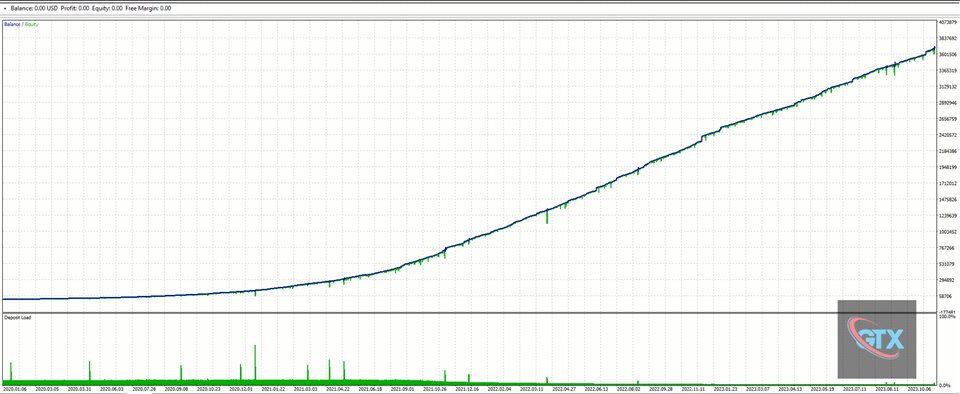
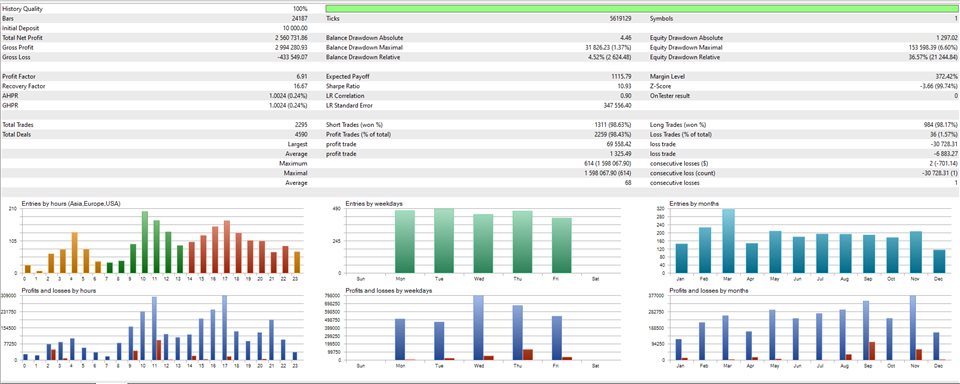
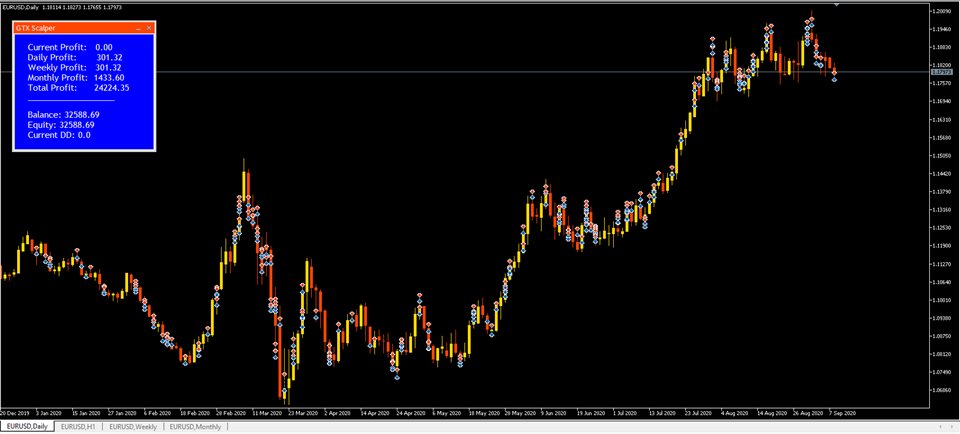
✅ Proven Performance
The advisor has been successfully trading for over a year, delivering stable results. Based on this advisor, the developer has created an improved product (Cetus) which opens orders 50% more frequently while maintaining the same signal precision, demonstrating the effectiveness of the underlying strategy.
Real Market Performance Data
📊 MQL5 Market Statistics
🎯 Trading Strategy Details
Why Choose GTX Scalper
📊 22 Customizable Strategies
GTX Scalper offers 22 unique strategies fully customizable to meet your needs. You can optimize them at your discretion or use the default parameters. Our analysis confirms the excellent customization rating of 9/10, making this EA extremely flexible for different broker conditions and trading preferences. The multi-strategy approach allows traders to find the best strategy for their specific market conditions.
✅ Proven Performance & Stable Results
Our analysis confirms the good reliability rating of 7/10, with this Expert Advisor showing stable performance. The advisor has been successfully trading for over a year, delivering stable results. The 4.55/5 MQL5 rating with 53 reviews supports this assessment, indicating a well-tested product with proven track record. Based on this advisor, the developer has created an improved product (Cetus) which opens orders 50% more frequently while maintaining the same signal precision.
🔀 Explore other options
Not set on GTX Scalper? See our ranked alternatives below—each with AI scores and a one-click compare view against this tool.
Market Performance & User Feedback
📊 MQL5 Market Data
- Rating: 4.55/5 stars (good, sub-ratings: 4.5, 4.4, 4.5)
- Platform: MetaTrader 5
- Price: $250 USD
- Developer: Vladimir Mametov (vladimit_m)
- Sub-Ratings: Description: 4.5/5, Reliability: 4.4/5, Usability: 4.4/5, Support: 4.5/5
- Compatibility: Works on ECN accounts with low spreads, recommended brokers: Roboforex, IsMarkets, Alpari
📈 User Reviews & Feedback
- Total Reviews: 53 reviews
- Proven Performance: EA has been successfully trading for over a year with stable results
- Improved Version: Developer created Cetus (improved product) which opens orders 50% more frequently
- Strategy Flexibility: 22 customizable strategies allow optimization for different broker conditions
- Risk Management: No martingale, dynamic and static Stop Loss, capital protection features
Settings & Configuration
GTX Scalper Configuration:
- Installation: Copy the .ex5 file to your MetaTrader 5 Experts folder
- Setup: Attach to ONLY one EURUSD chart on H1 timeframe
- Timeframe: H1 (1-hour) - this is the working timeframe for the EA
- Minimum Deposit: $100
- Leverage: Preferably 1:100 or more
- Account Type: Preferably ECN accounts with low spreads (recommended brokers: Roboforex, IsMarkets, Alpari)
- Lot Type: AutoLot (automatic) or fixed lot size
- Lot Size/Percent: 0.25 (recommended maximum: 0.2 for 1:500 leverage, 0.15 for 1:300, 0.07 for 1:100, 0.02 for 1:30)
- Trailing Stop: 20 (default, can be reduced to 19 for non-ECN accounts)
- Max Drawdown: 40% (parameter for limiting maximum drawdown)
- Trading Time: "00:00-23:59" (customizable)
- News Filter: Enable/disable news filter, pause 35 minutes before and after news
- Strategy Selection: 22 customizable strategies available - optimize for your broker conditions
💡 Tip: The EA comes with pre-configured settings optimized for most brokers. For users looking to tailor it to their specific conditions, you can optimize levels for Take Profit and Stop Loss, depth of recovery function, customization for each of the 22 strategies, and limits for maximum drawdown. The EA is ready-to-use but can be extensively customized.
Purchase & Resources
💰 Purchase GTX Scalper
GTX Scalper is available for purchase on the official MQL5 marketplace for $250 USD. The purchase includes the EA file, pre-configured settings, and access to developer support. Free demo version available for testing.
📚 Official Resources
User Reviews & Feedback Analysis
✅ Positive Feedback
Proven Performance & Stable Results
The EA has been successfully trading for over a year, delivering stable results. Users appreciate the proven track record and consistent performance. The 4.55/5 MQL5 rating with 53 reviews supports this assessment, indicating a well-tested product.
22 Customizable Strategies
Users value the 22 customizable strategies that allow optimization for different broker conditions. The flexibility to optimize strategies at discretion or use default parameters is highly appreciated. The multi-strategy approach helps traders find the best strategy for their specific market conditions.
Safe Trading Approach
Users appreciate the no martingale approach and capital protection features. The dynamic and static Stop Loss for all orders and maximum drawdown limits are the core protections; the optional recovery function is better treated as extra risk to configure carefully than as protection. The news filter and trading time filter help avoid trading during high-impact news events.
⚠️ Important Considerations
Optimization Required
The EA is extremely flexible in settings and can be optimized for any trading needs. Users should optimize settings for their specific broker conditions. The 22 strategies allow extensive customization, but optimization is recommended for best results. The EA works best on ECN accounts with low spreads.
Broker Requirements
Preferably ECN accounts with low spreads are required for optimal performance. Recommended brokers include Roboforex, IsMarkets, and Alpari. Leverage of 1:100 or more is preferred. The EA is not sensitive to broker conditions but works best with quality ECN brokers.
Moderate Profitability
The EA shows good profitability (7/10) with stable results, but returns are moderate rather than exceptional. The developer has created an improved product (Cetus) which opens orders 50% more frequently, suggesting the original GTX Scalper may have lower trade frequency but maintains signal precision.
Related Tools & Resources
🤖 MT5 Expert Advisors
Compare more MetaTrader 5 EAs scored by Fx Tools AI.
Frequently Asked Questions
How do I download GTX Scalper?
GTX Scalper is available for purchase on the official MQL5 marketplace for $250 USD. After purchase, download the .ex5 file from your MQL5 account and copy it to your MetaTrader 5 Experts folder. A free demo version is also available for testing before purchase.
What makes GTX Scalper different from other EURUSD scalping EAs?
GTX Scalper uses pivot points and overbought/oversold zones analysis with 22 customizable strategies. Unlike traditional EAs with fixed strategies, it offers extensive customization options allowing traders to optimize for their specific broker conditions. With 78% accuracy and good profitability (7/10), it's specifically designed for EURUSD scalping on H1 timeframe with news filter and trading time filter.
How do I install GTX Scalper Expert Advisor?
After purchasing GTX Scalper from MQL5, copy the .ex5 file to your MetaTrader 5 Experts folder. Attach it to ONLY one EURUSD chart on H1 timeframe. The EA comes with pre-configured settings optimized for most brokers, making it ready-to-use. For customization, you can optimize the 22 strategies, lot size, trailing stop, and other parameters according to your preferences.
What is the best broker for GTX Scalper?
Preferably ECN accounts with low spreads are required for optimal performance. Recommended brokers include Roboforex, IsMarkets, and Alpari. Leverage of 1:100 or more is preferred. The EA is not sensitive to broker conditions but works best with quality ECN brokers with low spreads.
What are the recommended settings for GTX Scalper?
GTX Scalper comes with pre-configured settings optimized for most brokers. Key settings include: Lot Type=AutoLot, Lot size/percent=0.25 (adjust based on leverage: 0.2 for 1:500, 0.15 for 1:300, 0.07 for 1:100, 0.02 for 1:30), TrailingStop=20 (can be reduced to 19 for non-ECN accounts), Max DD=40%, Trading Time="00:00-23:59", News filter with 35 minutes pause before and after news. The 22 strategies can be optimized for your broker conditions.
How does the pivot points strategy work in GTX Scalper?
The EA analyzes the market using pivot points based on overbought and oversold zones. It analyzes these zones in the market, generates entry signals based on pivot points, and manages orders using Trailing Stop or Take Profit. The EA limits losses with Stop Loss or an intelligent recovery function. All orders have dynamic and static Stop Loss for capital protection.
What is the difference between GTX Scalper and Cetus?
Based on GTX Scalper, the developer has created an improved product called Cetus which opens orders 50% more frequently while maintaining the same signal precision. GTX Scalper has been successfully trading for over a year with stable results. Cetus is the enhanced version with higher trade frequency, while GTX Scalper maintains proven stability.
Does GTX Scalper use martingale or dangerous strategies?
The developer states there is no martingale, and all orders carry dynamic and static Stop Loss. However, the EA also has an optional recovery function with a configurable depth that tries to win back losing trades; the listing does not fully describe how it sizes those trades, so treat it as added risk, test it on demo and keep the depth low (or off) if you want strictly stop-loss-only trading. The news filter and trading time filter help avoid trading during high-impact news events.