
Forex Trade Manager MT5 — Manual Trade Manager
4.98/5 MQL5 · v3.70 · InvestSoft · AI Score 9.4/10
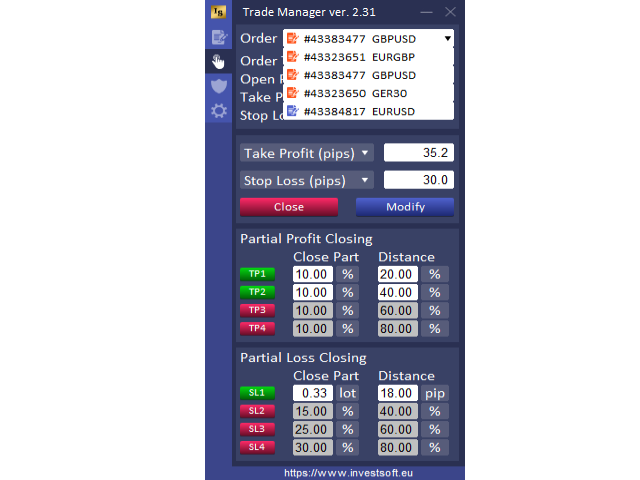
Forex Trade Manager MT5 by InvestSoft is a MetaTrader 5 trading utility—not an auto-trading Expert Advisor. It combines a chart-based trade planner with risk-based position sizing, Stop Loss / Take Profit management, break-even, trailing stop, partial close, and equity-protection style controls so discretionary traders can size and manage tickets from one panel instead of hunting native MT5 menus.
This MT5 trade manager suits manual forex, metals, indices, and multi-asset traders who already have an entry plan and want faster execution hygiene: drag entry/SL/TP lines, set risk, and manage open exposure with consistent lot math. It also works with non-standard charts such as Renko-style setups according to the listing. Demo the panel on a practice account first so you learn the workflow before live size; InvestSoft notes weekday support hours on the Market page.
Our AI rates Forex Trade Manager MT5 9.4/10—among the strongest MT5 utilities in our catalog on review depth and longevity. Accuracy and profitability are not scored because the tool does not generate entries; outcomes still depend on your discretionary strategy. See the AI analysis below for what that score means before you demo or buy.
Performance Overview
Try Forex Tool Finder — or jump to ranked alternatives after market analysis.
🤖 AI Analysis & Personalized Recommendation
Our AI Analysis Results
Based on our analysis of Forex Trade Manager MT5, here is what the scores mean for traders evaluating this manual trading utility:
📊 Accuracy: N/A
What this means: Accuracy is not scored for utilities—Forex Trade Manager MT5 does not generate entry signals. Results depend on your discretionary decisions; the panel sizes and manages them.
💰 Profitability: N/A
What this means: Profitability is not scored for trade managers. Equity-protection and trailing tools can help discipline, but they do not promise strategy returns.
⚡ Speed: 9.0/10
What this means: Chart-line planning plus risk-based lot calc and on-panel management is built for faster manual workflows than stock MT5 order dialogs alone.
🛡️ Reliability: 9.5/10
What this means: Multi-year Market listing (31 May 2019 → v3.70), 4.98/5 across 685 reviews, and 13,092 demos support an unusually mature utility track record.
🎚️ Ease of Use: 8.8/10
What this means: Core risk sizing and line-based planning are approachable, but full trailing / partial-close / equity tools still need a demo learning pass.
🔧 Customization: 9.3/10
What this means: Risk modes, SL/TP management, break-even, trailing, partial close, and equity-protection style options cover most discretionary desk needs.
🔗 Compatibility: 9.3/10
What this means: Native MT5 Market utility for forex and other symbols the terminal supports, including non-standard chart types per the listing—confirm on your broker demo.
🤝 Support: 9.0/10
What this means: Seller rating 4.9/5 (1,354); InvestSoft states weekday support (no weekend replies). Huge comment volume (929) helps peer troubleshooting.
🔄 Update Frequency: 9.2/10
What this means: Updated 18 Jun 2026 on Market version v3.70 after years of releases—strong continuity for a panel utility.
⭐ Community Reviews: 9.8/10
What this means: 4.98/5 from 685 reviews with 13,092 demos is elite social proof for an MT5 trade manager—still verify the demo on your setup.
Our AI score of 9.4/10 reflects one of the strongest MT5 trading utilities in our catalog—near-perfect review depth, long maintenance, and a complete manual risk/execution toolkit. It is not a signal robot; pair it with your own strategy and hard personal risk rules.
Best suited for: Discretionary MT5 traders who want risk-based sizing, chart planning, trailing/break-even/partial-close management, and equity-style guards without buying an auto EA.
Proceed with caution if: You want a hands-off Expert Advisor that opens trades for you, or you need weekend developer chat. Ranked same-platform utility options are in the alternatives section below.
Key Features & Benefits
📐 Risk-based lot calculator
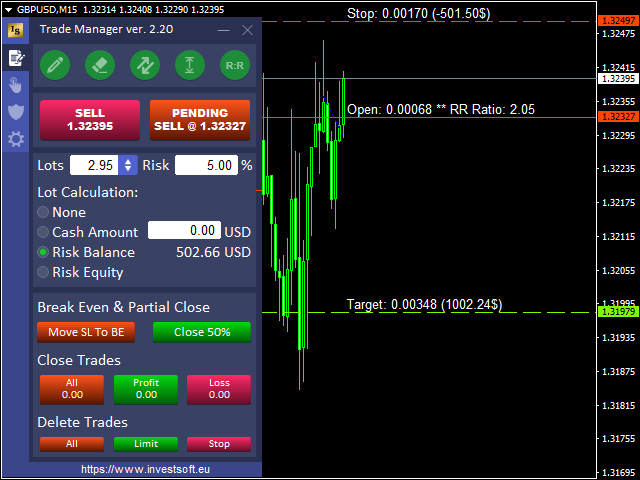
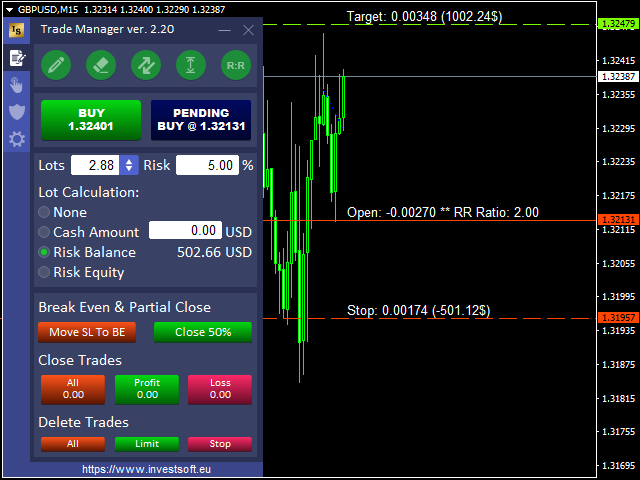
Mark entry, stop, and target with chart lines, set risk, and let the panel compute position size in real time.
🖱️ Chart trade planning
Draggable horizontal lines for entry, Stop Loss, and Take Profit keep planning visual before you send the order.
📈 Break-even & trailing
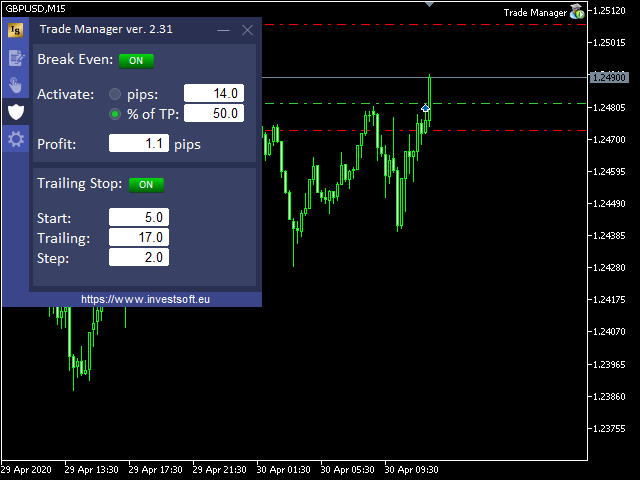
Manage open tickets with break-even and trailing-stop style controls from the panel instead of manual ticket edits.
✂️ Partial close
Scale out of winners in stages when your plan calls for banking partial profit without closing the whole position.
🛡️ Equity protection
Listing markets equity-protection style guards to help cap account damage when discretionary trades go wrong.
⭐ Review depth
4.98/5 from 685 reviews, 929 comments, 13,092 demos—rare sample size for an MT5 utility.
Real Market Performance Data
📊 MQL5 Market Statistics
🎯 Product Details
Why Choose Forex Trade Manager MT5
🧰 Complete manual desk
Sizing, planning lines, trailing, partial close, and equity-style guards live in one MT5 utility instead of several scripts.
⭐ Elite review depth
4.98/5 across 685 reviews and 13,092 demos since 31 May 2019 makes diligence easier than thin new panels.
🔀 Explore other options
Looking for another MT5 trade manager or risk utility? See our ranked alternatives section below.
Market Performance & User Feedback
Official listing: MQL5 product 39150 (Forex Trade Manager MT5). Rating 4.98/5 from 685 reviews, 929 comments, 13,092 demos. This is a manual trading utility—there is no developer auto-trading signal to copy; evaluate the demo and documentation instead. Buyer volume and multi-year updates are the main evidence base, not EA profit-factor charts.
👍 What stands out
- Elite 4.98/5 across 685 reviews with 13,092 demos
- Risk-based sizing + chart planning + trade management in one panel
- Long maintenance arc from 31 May 2019 through v3.70
- Accessible buy price versus many premium Market EAs
⚠️ Limitations to weigh
- Does not auto-trade—you still need a discretionary strategy
- Feature depth implies a learning curve before full use
- Seller support is weekday-focused (no weekend replies stated)
- Confirm panel behavior on your broker’s demo before live
Settings & Configuration

🎯 Platform
- Type: MT5 trading utility / panel
- Attach: Chart you plan/manage from
- AlgoTrading: Enable if your broker requires it for panel actions
- Demo: Free Market demo (13,092 downloads)
💰 Risk & sizing
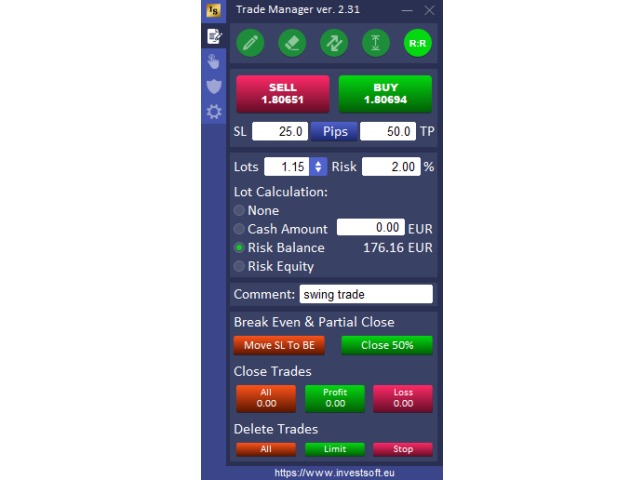
- Lot calc: Risk %, balance/equity, or fixed cash modes per listing
- Lines: Drag entry / SL / TP before sending
- Equity guard: Configure protection thresholds carefully
- Live: Start with small size while learning the panel
🖥️ Trade management
- Break-even / trailing: Manage winners from the panel
- Partial close: Scale out in stages
- Version: v3.70 (updated 18 Jun 2026)
- Docs: Follow InvestSoft notes on the MQL5 page
Purchase & Resources
💰 Purchase Forex Trade Manager MT5
Forex Trade Manager MT5 is available on the official MQL5 Market listing (product 39150). Confirm the live buy price on MQL5. Free MetaTrader 5 demo (13,092 downloads)—test the panel on a practice account before live use.
📚 Official Resources
Related Tools & Resources
Frequently Asked Questions
How much does Forex Trade Manager MT5 cost on MQL5?
The listing showed about $99 USD to buy on MQL5 (product 39150) when we checked. A free demo is available (13,092 downloads). Confirm the live price before purchase.
Is Forex Trade Manager an Expert Advisor that trades for me?
No. It is a manual trading utility. You decide entries; the panel helps size risk, place/manage orders, trail, partially close, and apply equity-style guards.
What does the position size calculator do?
You mark entry and Stop Loss (and target if used), choose a risk mode, and the panel calculates lot size from that risk instead of guessing volume in the Order window.
Does it include trailing stop and break-even?
Yes. The listing markets break-even, trailing stop, and partial-close style management for open positions from the panel.
What is our AI score for Forex Trade Manager MT5?
9.4/10 overall (performance 9.2, usability 9.1, trust 9.5). Accuracy and profitability are N/A for utilities. Elite 4.98/5 review depth and long maintenance lift the score; it still will not trade for you.
Where can I download or buy it?
Purchase or demo from the official MQL5 product page, then practice the panel on a demo account with v3.70 before live use.